Pen Testing Game Day
Are you ready to hack the mainframe?

^ This is you
Penetrating testing, or pen testing, is the art of ethical hacking where you break into systems to understand and expose their weaknesses, before malicious actors do. Then you can fix things before they become a problem. A true "hackathon" you might say.
This is a full day workshop, but it will be mostly done at your own pace, across time zones. Plan on being uninterrupted by meetings.
Application security is important. We are going to go through some exercises to help you understand how attackers try to dismantle and undermine your hard work. You will be more informed as you code new features, and you will be well-equipped to understand valid attacks attacks that have been reported against your team’s code.
There is a great project called the OWASP Juice Shop. It is a modem web application that has been purposely built to have lots of vulnerabilities from the OWASP TOP 10. You will be guided through how to make various attacks and be rewarded points for how many challenges you complete. It’s an educational game. We will not be hacking any of our company apps. Sorry.
Requirements
- a web browser
- docker installed locally
- ZAP
- a full uninterupted day
- reading this document IN FULL before starting
The intended audience is web developers with no pen testing experience. You will learn as you go.
Some of the later parts include coding challenges, but in this one-day version you will likely not get to those.
The Challenges
We're going to practice hacking into the OWASP Juice Shop. This is a little like a hackathon, but its focused on education. It's like a video game that teaches you how to be a hacker, but with a focus on application security for everyday web developers.
Basically, you're going to:
- Get the OWASP Juice Shop running on your machine.
- Start playing around with the website.
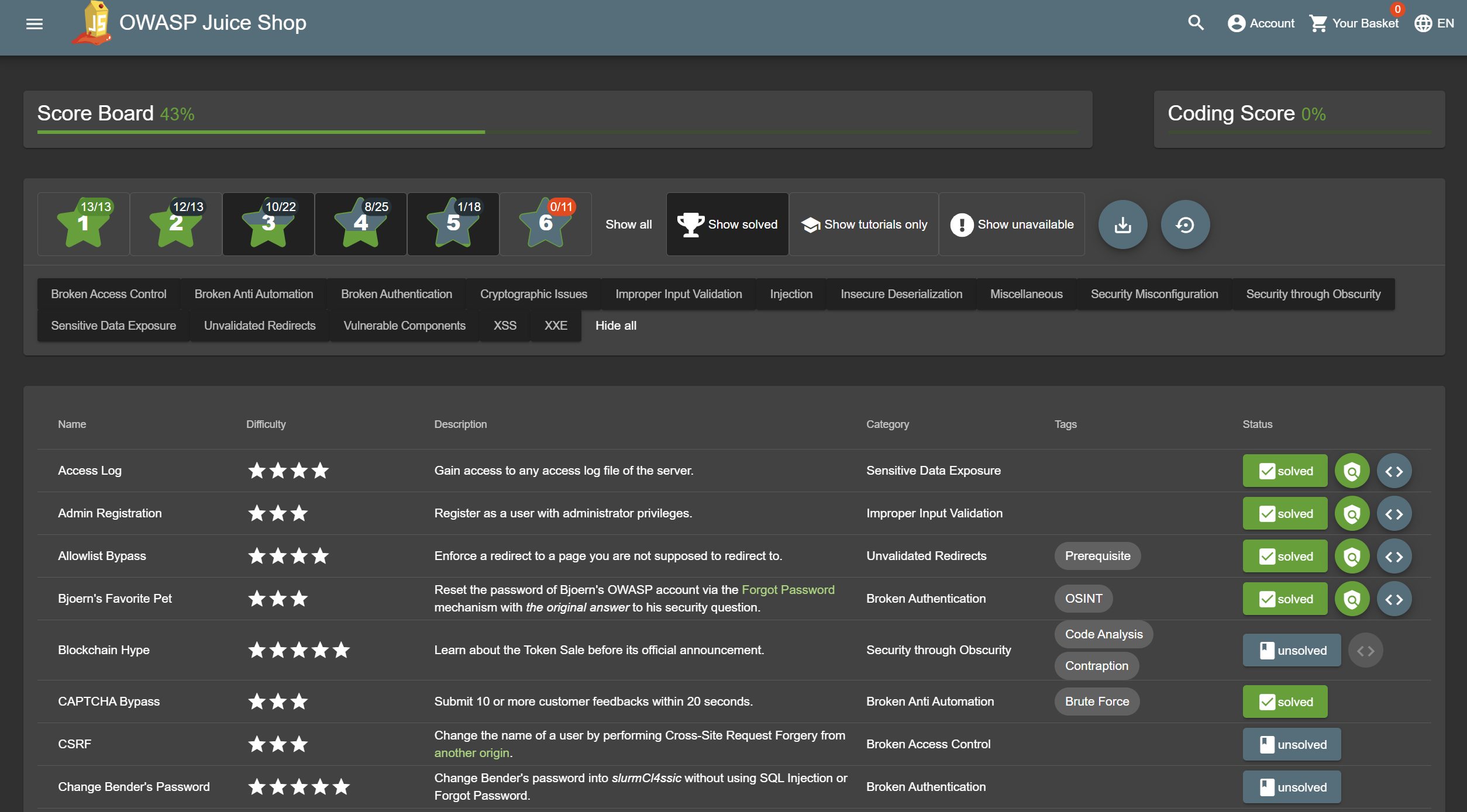
- Find the scoreboard which contains the list of challenges.
- Start tackling the various challenges.
- In the beginning, your browser DevTools might be enough. As you progress, we will set up ZAP so that you can have more powerful tools at your disposal.
For each of the challenges, you can start on your own. If you run out of ideas on your own, you can fall back to using the tutorials or online walkthroughs. Remember, the goal is to learn.
People are encouraged to be friendly and social, but each person should go through the challenges on their own and at their own pace in order to get the practice. I will be available on Slack to help people who get stuck.
Try to keep communication on Slack since not everyone is in office.
Note that some if the instructions here have a lot of details while others are purposefully lacking. Thats part of the challenge. Please read/skim the whole document before getting started so you know how to pace yourself.
Part 1 - Getting started
Learn about the OWASP Top 10. Short read here. Long read here if you want more depth.
Install OWASP Juice Shop locally. The companion guide has instructions for running it in various ways. I recommend using Docker which you can start like so:
docker run -p 3000:3000 \
           -e NODE_ENV=tutorial \
           bkimminich/juice-shop
Now visit http://localhost:3000
Browse the application and read about the happy path.
Find the scoreboard.
Using your browser dev tools complete 3-5 challenges.
You should not spend more then an hour on part 1. If it takes longer, ask for help.
When ussing a Capture The Flag server
To make this competion more lively you may be instructed to use a "Capture The Flag" server. This is a shared web app where we can see everyone's progress on the challenges.

For this to work you shoud be given its URL and a CTF_KEY. Additionaly you will need to restart your juice shop in a different mode. This will disable tutorial mode, but your scores should be retained across starts.
docker run -p 3000:3000 \
           -e CTF_KEY="xxxxxxxx" \
           -e NODE_ENV=ctf \
           bkimminich/juice-shop
Now when you look at a challenge you completed there should be a flag next to it. Click that flag to get the key. Then find that challenge on the score server and paste it in. You should stat by backfilling it with the challenges you already completed.
Part 2 - Tooling
We are going to use an open source tool called the Zed Attack Proxy
(Zap) to help automate some attacks.
Tools like this are super powerful, but also complex. There are many options, modes, and views that can often be hard to find. Just do your best when playing around. When doing a manual scan it sometimes works with Firefox better then Chrome or vice versa. I recommend ignoring the heads up display option in Zap, as it does not always work.

Start by enabling the "Community scripts" and "Python support" add-ons.
Poke around in the app and check out a video or two from the their videos archive page to get to know some of its capabilities.
Now lets try to use a simple script to change something on pages throughout the site. Open the script tab. Http Sender -> change_response.py
Change the title of the site to something different like "Hacker Fun Party"
Start the proxied browser through Zap. Now browse the site and click various links and see that the title is your new title.
Run the "automated scan" with "ajax spider" enabled. Let it run long enough and it may automatically solve some of the challenges for you!
Do the "Password strength" challenge using Zap's "fuzzer". For this you will need to use a password list. You can create your own, or find one online like this one. Note you will have to find the admin user name first. Look around the site to see if you can find it.
This doc presents a high level starting point of how you can use Zap to treat the OWASP TOP 10.
You have only scratched the surface of what these kinds of tools can do, but this should give you a feel for the basics of what an attacker has in their toolbelt.
Spend no more than 2 hours on this section.
Part 3 - Challenges
Solve the next few hacking challenges. Once you solve the first group of about 10 tutorial questions, it will show you another 100+ challenges. Now you can you can hunt around or filter by type or difficulty for your next challenges.
Also answer the coding challenges for the ones you already completed. They are very quick and dont actually involve writing code. And it boosts your score.
Once you have a feel for things, start tackling harder ones. If you really get stuck search online for a walkthrough. You will still learn a lot this way.
Pens down at 3:30pm PST. Just kidding - keep working on it if you are having fun.
Closing
Congratulations! You have now defeated the internet with your amazing hacking skills. Now use those skills for good. Code defensively in your web development work.
If you really loved it, you could get paid to do this. This is a computer security profession: https://www.linkedin.com/jobs/penetration-testing-jobs-san-francisco-ca/

Do you want to run a game day?
There are many resources online for running various workshops. The above should serve as a playbook for most of what you need. Here are some additional tips:
- Run this as a 1-2 day workshop, depending what is allowed since people will not be working those days.
- The day before the workshop, I give a 30 minute intro presentation. I do this the day before so they have the whole following day to work on it. This also works best if the team is across timezones. Typically this includes:
- 5 minutes of high level slides
- 10 minutes for questions/discussion
- 15 minutes for people to read through the doc and/or setup Zap on their machines since that could take some troubleshooting.
- It is important to make sure everyone has read through this whole doc before starting as it answers a lot of questions that have come up every time I give the workshop.
- Setup a capture the flag server. The focus is on learning, not competing, but I find having the score board up encourages people to make a dent in the challenges. And its fun to watch. I find CTFd to be the simplist to get up and running. You can serve it from your desktop if you want. I use tailscale to expose it publicly for the day. Its also fun to share the score board to other folks at the company so they can watch the competition.
- I dont really have a specific ending or closing ceremony since it is self paced and some people may want to work on it more the next day. But I do always collect feedback shortly after so I can improve it later.
Document last updated: 19 February 2026